

Within the SAP environment, locating a specific transaction is not always a straightforward task. A clear example arises when attempting to select sales orders for printing—a seemingly simple task that can pose a considerable challenge. Try entering transaction VA71 (the standard transaction for printing sales orders).
If a selection screen appears, navigate to the section titled “Treatment of Sales Order Messages,” where an example is provided. If the message “Transaction VA71 does not exist” appears, it indicates that the version you are working with does not include it. Don’t worry; this post will guide you on how to create it.
Create Transaction for Mass Processing of Sales Order Messages
This functionality is achieved with program SD70AV1A. Since the handling of sales order messages is typically a user task, merely executing this program is insufficient. It is necessary to create a transaction and authorize the corresponding users. You can choose to create a transaction with identifiers Y or Z and associate it with this program. Another option is to follow the steps outlined in note 2784287, titled “New Transaction VA71 for Sales Document Output report SD70AV1A.” It is crucial to meticulously follow the manual steps indicated in the note to avoid potential issues with future releases.
The note provides steps for creating transaction VA71:
From transaction SE93
Transaction code: VA71
Package: VN
Program: SD70AV1A
Selection screen: 1000
Authorization object: V_VBAK_VKO
It must stay like this:

Mass Treatment of Sales Order Messages
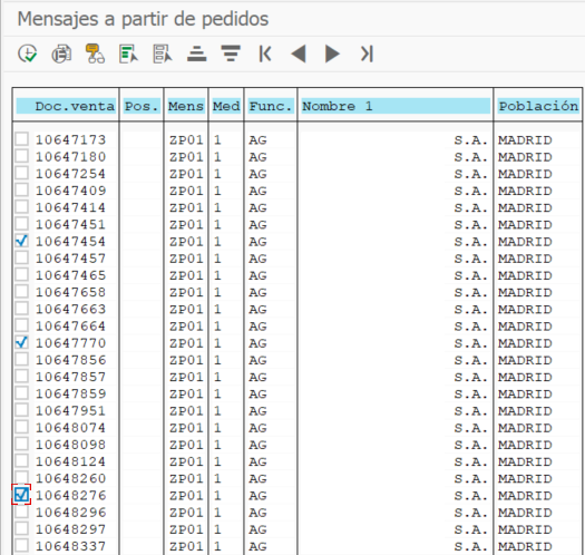
Execute transaction VA71 (if your SAP version has it), or the Y or Z transaction created, or directly run program SD70AV1A. The selection screen is analogous to the mass printing of deliveries (VL71), where you can filter by desired fields (previewing is also possible). Once this action is completed, it is executed.

Once executed, the following screen will appear:
At ImagineRight, we have specialists in SAP Logistics with extensive experience, capable of assisting you in optimizing processes and solving issues, like the one we’ve addressed in this article. Feel free to reach out to us for any inquiries. We’ll be delighted to assist you.
